Free template
Travel Itinerary Template for Notion
What’s inside
- Day-by-Day Planner database — day, date, time slot, activity, location, cost, booked checkbox
- Bookings database — type, confirmation number, dates, cost, status (researching → booked → paid)
- Budget database with two views: grouped by category, and grouped by who paid
- Packing list database grouped by category, with a Packed checkbox
- Pre-trip checklist as to-dos
Made a copy but it didn’t open? It’s saved in your Notion workspace — open Notion.
Rather not fill it in yourself? Answer eight quick questions and our AI writes the whole itinerary for your destination — day-by-day plan, budget, food guide — then exports it in this exact format. Free, no signup.
A travel itinerary in Notion suits travelers who want the trip to live next to the rest of their life — databases for days and bookings, views you can regroup on the fly, and one page that holds everything from the flight PNR to the packing list.
Our Notion planner mirrors the structure of our other templates: a day-by-day database with time-slot views, a bookings tracker with confirmation numbers, a budget that groups by category and by who paid, and tickable packing and pre-trip lists.
A look inside the Notion template
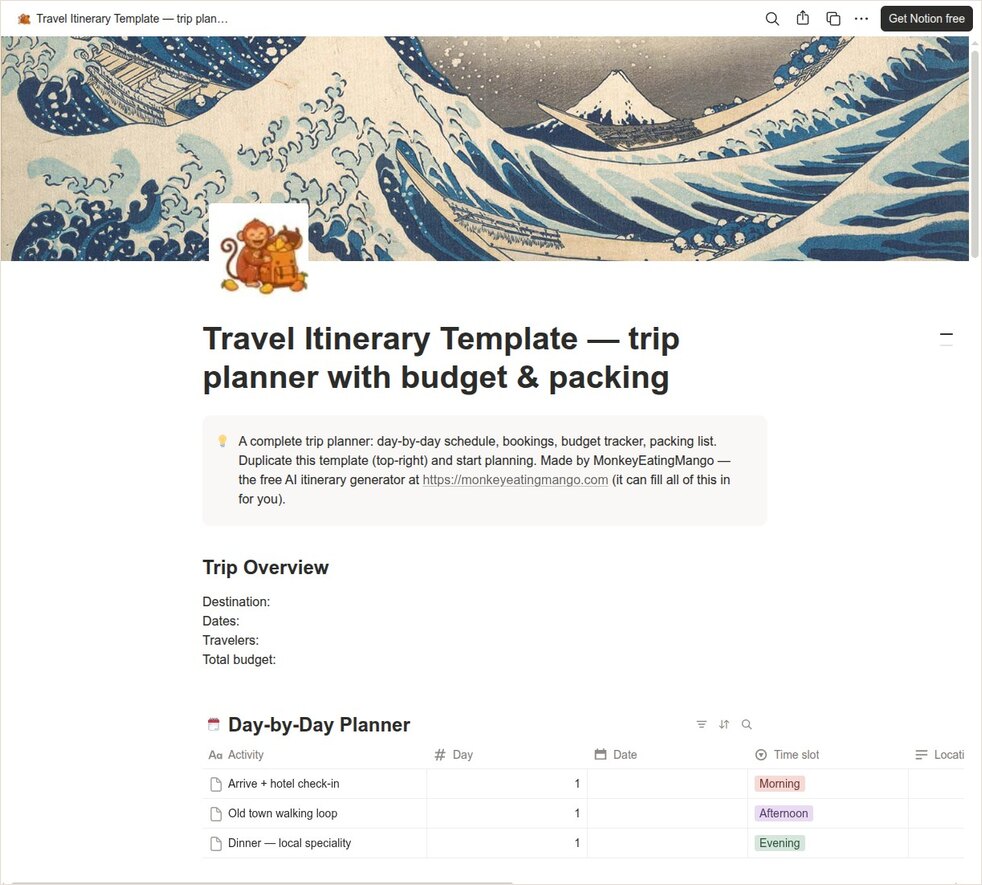
How the Notion version is organised
- 1Trip Overview block — destination, dates, travelers, budget at the top of the page.
- 2Each planning area is a database, so you can switch between table and board views.
- 3The Budget database’s "by who paid" view is the group cost split — regroup in one click.
- 4Hit Duplicate (top-right of the template) and the whole page — databases included — copies into your workspace.
Editing tips
Duplicate once per trip
Keep the original as your master and duplicate it (or duplicate the page inside your workspace) for each new trip — past trips stay archived with their budgets and notes intact.
Databases beat blocks for itineraries
Resist the urge to plan days as plain text blocks. A database with a "Day" property lets you filter to today while traveling, group by city, or flip to a board per time slot.
Frequently asked questions
How do I duplicate the template?
Open the template link and click the Duplicate icon in the top-right corner (you need a free Notion account). The full page — all five databases, views, and checklists — copies into your workspace.
Is the Notion template free too?
Yes — free to duplicate, no email gate, same as every template we publish.
Can the AI fill a Notion itinerary for me?
Not directly into Notion yet. Generate your itinerary free at monkeyeatingmango.com and paste sections in, or use the Google Docs export which Notion imports cleanly.
Get the Notion template
Duplicate the template in NotionFree · copies straight into your workspaceOpens in a new tab — click "Duplicate" (top-right) to copy it in.New templates, straight to your inbox
We add formats and occasion planners regularly. Leave an email and we'll send new templates and practical trip-planning tips — no spam.
Other formats
Google Sheets template · Excel template · Word template · Google Docs template · PDF (printable) template
Planning a specific kind of trip?
Bachelorette itinerary template · Disney trip itinerary template · Road trip itinerary template · Business travel itinerary template · Birthday trip itinerary template · Family vacation itinerary template · Honeymoon itinerary template · Girls trip itinerary template
Keep planning
11 Wanderlog alternatives compared · Best AI travel planners, compared · Croatia travel guide
Prefer it already planned? Browse 100+ ready-made itineraries — every one exports to PDF, Excel, Word, Google Sheets and Google Docs.