Free template
Travel Budget Template for Google Sheets

Shobhit Shrivastava · Founder
Made a copy but it didn’t open? It’s saved in your Google Drive: find it in Drive.
Rather not fill it in yourself? Tap through 8 quick cards and get the whole trip planned for your destination. Free, for now. No sign-up.
- Made for your trip: Built around who is going, your interests, pace and budget
- Real places: Every stop checked against real venue data, and closed places swapped out
- Booking checklist: What to book and how far ahead, from flights to stays
- Day by day: Times, travel between stops and a budget
- Local guides: What to eat, what to buy and where, and the festivals on your dates
What’s inside
- Trip settings
- Dates, travelers, both currencies and one exchange rate, filled in once
- At a glance
- Planned, spent, remaining, left to allocate and a daily budget for the days left
- Planned budget
- Seven categories with planned, spent and left, totalled for you
- Spending log
- 30 rows: date, item, category, amount, currency and who paid
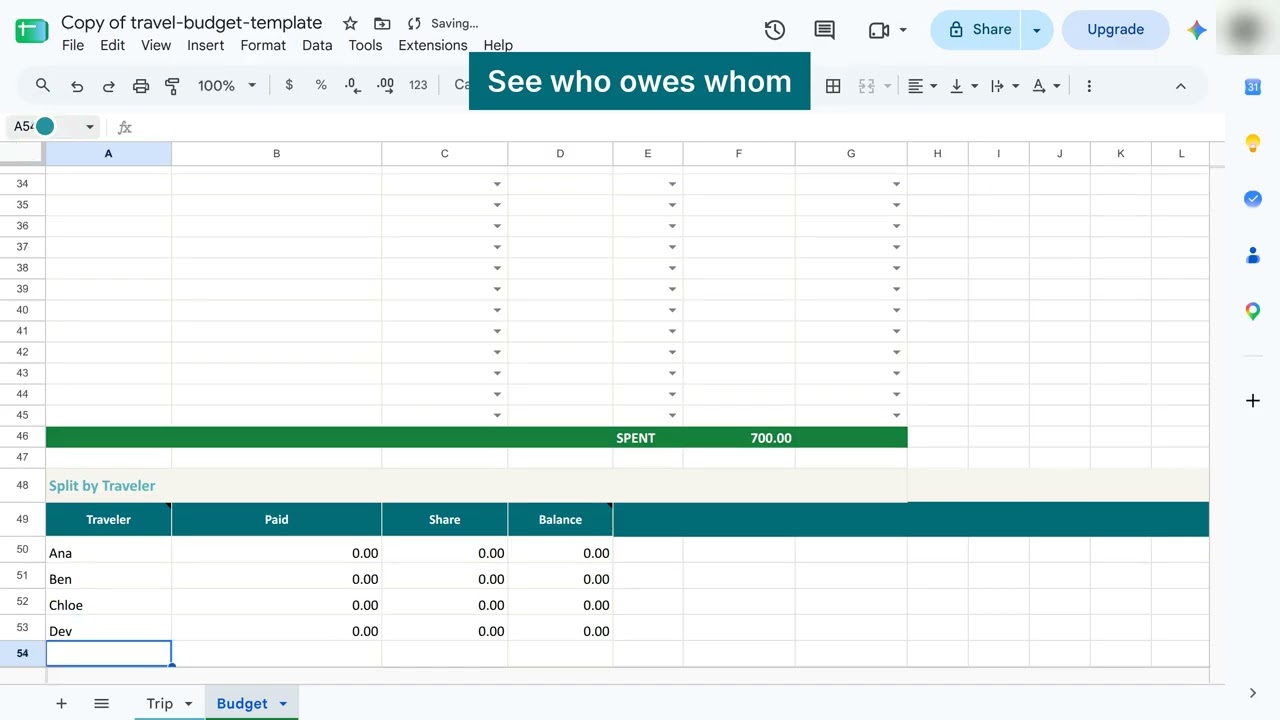
- Split by traveler
- What each person paid, their share and who owes whom
A look inside the Travel Budget template
Plan the trip by category, then log each spend in the currency you paid in. The sheet converts it to your home currency, totals it against the plan and tells you what is left to spend per day.
On a group trip, name the travelers and pick who paid on each line. The split works out everyone's share and who owes whom, so nobody settles up from memory at the airport.
How to use the travel budget template in Google Sheets
- 1Click "Google Sheets: make a copy" above and confirm. The copy lands in your Drive.
- 2On the Trip tab, fill in the dates, travelers, your home currency, the trip currency and the rate: how much trip currency one unit of home currency buys.
- 3On the Budget tab, put a planned amount next to each category. Your total budget minus the plan shows as "Left to allocate".
- 4Log each spend as it happens: date, item, category, amount and currency. The home amount converts on its own.
- 5On a group trip, type the travelers' names under Split by Traveler and pick who paid on each line.
Editing tips
Set the rate once, before you go
Every line converts through the one rate on the Trip tab, so changing it mid-trip re-prices the past too. Take the rate the day before you leave and leave it alone; the totals then match what you planned against.
Log what cash buys, not the ATM withdrawal
A withdrawal logged as spending counts the same money twice once you log the dinner it paid for. Log the purchases, and put the ATM fee under Other.
Frequently asked questions
Is this travel budget template free?
Yes. Copy it into your Google Drive or download the Excel version. There is no email gate and nothing to sign up for.
Does it handle two currencies?
Yes: a home currency and one trip currency. Pick the trip currency on a line and the amount converts through the rate on the Trip tab; leave Currency blank or pick the home currency and it counts as is. A trip through a third currency needs its own copy, or convert those lines yourself.
How does the split by traveler work?
Type the names of everyone sharing the costs, then pick who paid on each spend. The split adds up what each person paid, divides the total evenly among the names listed, and shows the difference as the balance: positive means the group owes that person, negative means they owe the group. Leave out anyone the group is treating; a spend with no payer picked stays out of the split.
What does "Daily budget left" mean?
What remains of the planned budget, divided by the days of the trip still ahead, today included. Before the trip starts it covers every day; on the last day it is whatever is left.
Is the budget different from the one in the itinerary template?
No, it is the same Budget tab. The itinerary template adds a day planner, bookings, packing and pre-trip lists around it; this one keeps just the money, with a few extra totals on the Trip tab.
Get the Travel Budget template
Google Sheets: make a copyFree · no email · no sign-up with usOpens in a new tab: sign in to Google, then click "Make a copy".Other formats
Excel itinerary template · Google Sheets template · Word itinerary template · Printable PDF template · Google Docs itinerary template · Notion template
Planning a specific kind of trip?
Bachelorette itinerary template · Disney itinerary template · Girls trip itinerary template · Road trip itinerary template · Business travel itinerary template · Birthday trip itinerary template · Family vacation itinerary template · Honeymoon itinerary template
Just one part of the plan
Prefer it already planned? Browse 134 ready-made itineraries. Every one exports to PDF, Excel, Word, Google Sheets, or Google Docs.