Google has no single trip planner in 2026: AI Mode in Search drafts the itinerary, Gemini answers in chat, Maps keeps the places, Flights watches prices and Calendar holds the bookings. For a first draft, use AI Mode's Canvas where it is available or Gemini anywhere; for everything after, the rest of the kit fills in. Gemini, the one tested, left six of fifteen must-dos unanswered on a Tokyo test.
Try free
Plan a trip in about 2 minutes
Tap through 8 quick cards for a complete itinerary with budget, maps, and packing lists. No account required.
Plan a trip →Disclosure: MonkeyEatingMango, the product behind this blog, appears at the end as a non-Google option. Google features are described from Google's own announcements, dated where they appear; Gemini's plan comes from a test run on October 21, 2026.
- No app since 2019. Google Trips closed on August 5, 2019 (TechCrunch).
- AI Mode Canvas builds a day-by-day itinerary with flights and hotels: launched in Labs in November 2025, open to everyone in the U.S. in 2026.
- Gemini plans in chat: 8 of 20 on the Oh-No Travel Index, lower is better, after its default mode errored twice.
- Maps lists hold places and collaborators, not days.
- Flights and Calendar track fares and show the bookings Gmail finds.
Does Google have a trip planner?
Google has no single trip planner app in 2026. Google Trips, the app that gathered reservations, saved places and notes, shut down on August 5, 2019. On May 1, 2023, Google also removed the trip summary on google.com/travel and said reservations sent to Gmail would keep appearing in Google Calendar (Skift).
What replaced it is five tools that each do a part:
| Tool | What it does for a trip | Plans days? | Where it works, as of October 2026 | Cost |
|---|---|---|---|---|
| AI Mode Canvas (Search) | Drafts an itinerary with flights, hotels, restaurants and sights | Yes | Everyone in the U.S., in English | Free |
| Gemini app | Answers a trip brief in chat | Yes, as text | Wherever Gemini runs; a Google account | Free tier; tested on a Workspace account |
| Google Maps lists | Saves places with notes; collaborators can edit | No | In the Maps app and on the web | Free |
| Google Flights and AI Mode | Price alerts; points and miles prices | No | Price tracking in 180+ countries, outside the EEA | Free |
| Google Calendar | Shows flights and hotels found in Gmail | No | With Gmail smart features on | Free |
How do you plan a trip with Google AI Mode?
Google AI Mode plans a trip through Canvas, a side panel in Search that turns a trip description into an editable itinerary. Open AI Mode at google.com/ai, describe the trip, and choose Create Canvas from the first answer (Google, January 2026). Canvas pulls in live flight and hotel prices, photos and reviews from Google Maps, and pages from across the web (Google, November 2025). Plans save as you go and share as a public link.
The catch is reach. Google launched Canvas trip planning in November 2025 for U.S. desktop users in its Labs experiment, and by April 2026 said travel planning with Canvas "is available for everyone in the U.S." (Google, April 17, 2026). Outside the U.S., check google.com/ai from your own account before planning around it.
AI Mode added three travel features on August 27, 2026 (Google):
- Flight price alerts from a chat, in more than 180 countries and territories outside the EEA.
- Points and miles prices for flights and hotels with partners such as Alaska Airlines, American Airlines and Hilton.
- Hotel booking in the U.S. in English, through Booking.com, Expedia, Marriott and others, paid with Google Pay.
Is Gemini good for trip planning?
Gemini is good for a quick written plan and weak on the practical questions a first trip needs. On a 7-day Tokyo brief on October 21, 2026, Gemini's 3.6 Flash mode returned seven themed days in about 50 seconds, and one of its 21 named stops, the Unicorn Gundam statue in Odaiba, had ended its display on August 31, 2026. It scored 8 of 20 on the Oh-No Travel Index, tied for the second-best score among the ten outside planners tested.
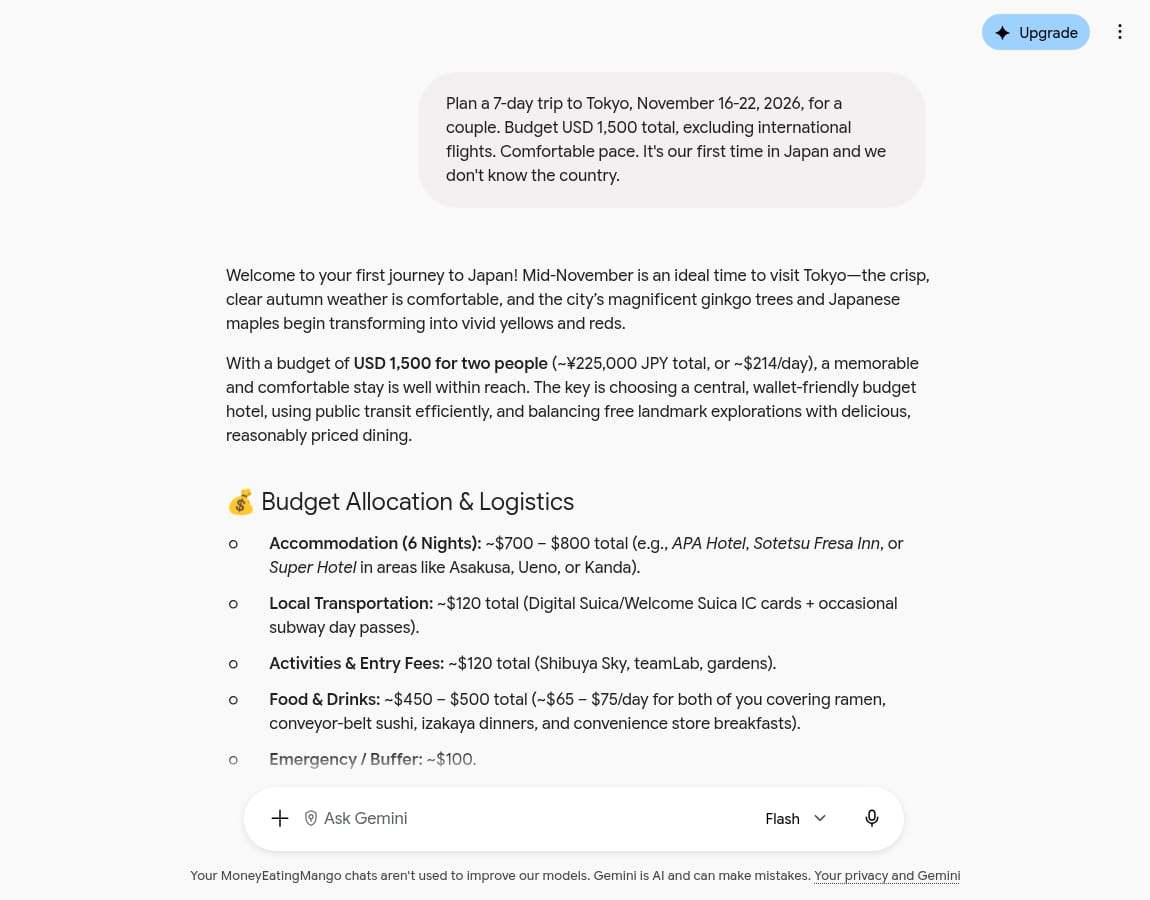
The default mode is the problem. Gemini's Thinking mode, the one a new chat opens in, returned an error twice after about six minutes, and nothing on screen suggests switching to Flash. The Flash plan covered the transit card, cash and an eSIM, then left entry papers, closures, packing, scams, a day trip and the leaving day unanswered. Its budget table summed to exactly USD 1,500 while counting 7 hotel nights for a 6-night stay.
The plan also stays in the chat: no clock times, no map and no itinerary object, only text. The best AI trip planner roundup compares it with the other ten planners on the same brief.
Can you plan a trip on Google Maps?
Google Maps can hold the places for a trip, not the plan. Save places into a list, add a note to each, and invite collaborators to edit the list or share a view-only link (Google Maps Help). That makes a good shared wish list for a group.
What Maps lists do not do is put the places into days or times. Use one alongside an itinerary: the list keeps the pins on your phone, the itinerary says which day each one belongs to.
Where MonkeyEatingMango fits
Disclosure: this is the product behind this blog, described the same way as the Google tools above.
MonkeyEatingMango asks 8 questions and returns a dated plan with a time and a cost on every stop; downloads, Google Sheets included, cost $0.99 per trip. On the same Tokyo brief it scored 4, with one stop scheduled after closing, a day that doubles back, the JR Pass question missed and the Monday closures it planned around left unexplained. It asks no budget, so its estimate of USD 2,419 on the ground went about 61% past the brief's USD 1,500 with no warning. To build the plan by hand instead, the free Google Sheets travel planner template lays out days, bookings and costs.
Last updated October 2026.

Written by Shobhit Shrivastava · Founder
Related reading
Best AI Trip Planner 2026: 11 Scored on One Tokyo Brief
Eleven AI trip planners received the same 7-day Tokyo brief in October 2026 and were scored on the Oh-No Travel Index. iMean and Gemini scored best of the outside tools; Mindtrip, now behind an account, answered 3 of 15 must-dos.
Best Travel Apps 2026: By Trip Phase, With Prices
Twelve travel apps grouped by when you open them: planning, flights, bookings, getting around, money and memories. What each one's free tier covers, the price of the paid one, and the setup most trips need.
How MonkeyEatingMango Works (Step-by-Step Guide)
A walkthrough with screenshots: answer 8 tap-based questions, get a day-by-day itinerary with costs, food guide, packing list, and Google Maps routes. Free to generate and read with no signup; exports are a one-time $0.99 per trip. Works on any device.